The Origin Viewer
The Origin Vieweris a freely distributed, standalone application that allows viewing and copying of information contained in Origin project files and Origin window files, on computers that do not have Origin installed. This updated Viewer supports Origin's newest OPJU project file and window file (OGGU, OGWU, OGMU) formats, as well as the older OPJ and OGG, OGW, and OGM file formats.
The Viewer does not require installation and it is quickly mastered, making it an ideal way to share your Origin data with colleagues who may not be Origin users. Non-users will find the Origin project's "folder and file" structure to be be intuitive and easy to navigate. In addition, because the Viewer can be carried on a thumb-drive, it allows for impromptu sharing of Origin data and graphs in meetings and classroom settings. Double-click to run the executable, drop your Origin project file onto the Viewer and you are ready to go. If you are collaborating on a report or manuscript, pack the Viewer along with your project file, and the lead author can copy and paste your data and graphs where needed, into the document.
|
Convert OPJU files to OPJ files
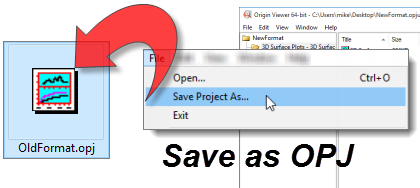
Origin 2018 introduced a new Unicode-compliant (UTF-8) project file type -- the OPJU file. These files cannot be opened in pre-2018 versions of Origin (Origin 2018 and newer versions retain the ability to save files in the older OPJ format). For backward compatibility, Origin users and non-users alike will appreciate that the free Viewer can convert OPJU files to the older OPJ format. If you have been given an OPJU file and cannot open it in your older version of Origin, (1) download and run this Viewer (no installation needed!), (2) drop your OPJU file onto the Viewer and (3) choose File: Save Project As and save as OPJ.
Note: This feature is only available in the Windows Viewer; it is not supported by the Mac Viewer
|
|
Read a review of the Origin Viewer in Scientific Computing World.
- The Origin Viewer is easily distributed as a single file - no installation needed.
- New - Windows Viewer 9.9.5 -- compatible with Origin 2022 -- is now available for 64-bit Windows.
- New - The Viewer 9.9.5 supports export of worksheet data to CSV.
- A native Mac version (9.6.5) is available for select Mac OS (see below).
- Both the Windows and Mac Viewer support the newer OPJU, OGGU, OGWU file types, introduced in Origin 2018.
- Use the Viewer to convert OPJU files to the older OPJ format.
- Graph zoom in, zoom out and whole page (restore) views.
- Support for viewing and rotating Origin's 3D OpenGL graphs.
- Explorer panel support for extra-large icons view, mouseover graph previews, icon or details views of windows, show/hide columns of details view (Windows only).
- Viewing of matrix images or image plots with the Windows Viewer requires ImagePack file download (see FAQ section).
- The Origin Viewer does NOT support: Worksheet Conditional Formatting, HTML Mode for Notes Windows, Compound Line Styles (Mac Viewer), Worksheet Cell Formulas and plots of that data, Geologic Patterns in Fill Area graphs, Statistical Reference Lines, or 2D Function Plots (3D Function and Parametric Function Plots are supported), Pie Map, Pie and Doughnut Charts, Sunburst Plots, Cluster Plots, Durov Diagram, Stiff Diagram, Kite Diagram, Violin Plots; and any plot with inserted images, including those on map backgrounds. In addition, some objects created by LabTalk script may not be supported.
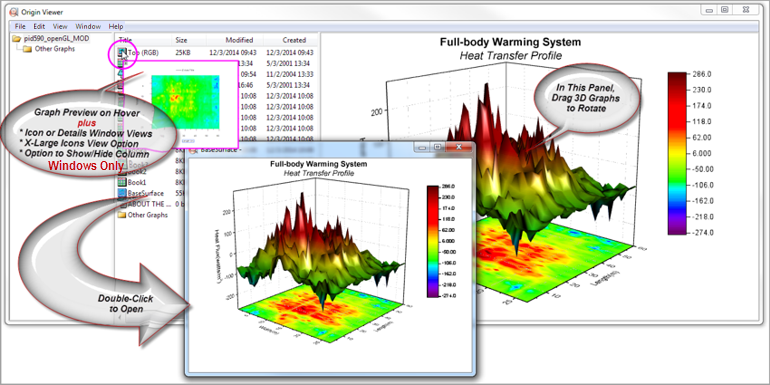
Origin Viewer Window. Double-click on a graph icon in the Origin Viewer to open the graph in a resizable graph window (multiple graph windows may be opened simultaneously). Click and drag a 3D OpenGL graph in the Viewer window to change the view angle.
System Requirements and Download
- Windows 7, Windows 8.0/8.1, Windows 10, Windows 11 (Viewer 9.9.5)
or
Mac OS 10.10 (Yosemite) - 10.15 (Catalina) (Mac Viewer 9.6.5).
Not compatible with 11.0.1 (Big Sur).
- Approximately 30 MBs of disk space
 Download the Origin Viewer Download the Origin Viewer
You can read more about bug fixes and changes in past and present versions of the Viewer, in our Release Notes.
You can learn more about the Viewer by watching this Video Tutorial.
|
“Flight Test Engineer staff uses Origin for data reduction and plots. Having viewer will facilitate review of report plots in Origin format, rather than multiple time consuming iterations of conversion to PDF.”
James Wright
XP Services, Inc.
“I have some Origin figures I want to share with colleagues. With this Viewer, I don't have to export my graphs, I can simply have my colleagues use the Viewer.”
Michael R. Schock
USEPA, Office of Research and Development
Note: These opinions are personal opinions and do not imply any statement, endorsement or preference of the U.S. Federal government.
|
Frequently Asked Questions
- Q: Is the Viewer free?
A: Yes.
- Q: What parts of an Origin Project (OPJ or OPJU) does the Viewer let me see?
A: You can view most Origin project file content in the Viewer. This includes worksheet and matrix data, graphs and layout pages, analysis results that were outputted to the Results Log, and Notes windows. A left navigation pane displays window and folder information in a Windows Explorer-like hierarchy.
There are some limitations: Some Origin objects and graph types are not supported by the Viewer (see the intro section, above). In addition, if your Origin project contains MS Excel workbooks, you cannot view the Excel data or any Origin plots of that data.
- Q: Can I access the data from files created with an older version of Origin (e.g. version 5.0)?
A: Yes, OPJ and ORG files made with Origin versions 4.X and later can be opened with the Viewer. Once the OPJ or ORG file is loaded, you can navigate to any worksheet and select and copy the data, then paste it wherever you want. If you have difficulty opening an ORG file from the File menu, drag and drop the file onto the Viewer. ORG files created with Origin versions 3.X and earlier cannot be opened in the Origin Viewer.
- Q: Can I access the graphs or layouts for my own use?
A: Yes. On the Windows platform, Graphs and Layout pages in the Origin project can be copied and pasted as EMFs into other applications.On the Mac platform, Graphs and Layout pages can be copied and pasted as PNG and PDF images. The Viewer cannot be used to copy data created with the Evaluation (Demo) version, nor will it copy data from Origin projects created with versions previous to Origin 8.1.
- Q: When I try to view some of the graph windows in my Origin project, I see the following message: "Image support missing. Visit http://originlab.com/viewer for more information." What is this about?
A: To view matrix images or image plots with the Windows Viewer, go to the Origin Viewer download page and download the correct ImagePack zip file for your Windows OS. Unzip the contents to the folder where you are running your Origin Viewer. Close and re-launch the Viewer, then open your Origin project file. You should now be able to view matrix images and image plots.
- Q: If I wanted to send an Origin project to a colleague who does not have Origin, what is the best way to include the Viewer?
A: The downloaded Viewer and any needed support files can be sent along with your Origin project, to your colleague. Your colleague can then copy the Viewer and files to his or her hard drive and run the application without an installation process. Of course, you can always direct your colleague to the Origin Viewer download page. Your colleague can then download and install the Viewer on his/her own.
- Q: Can I install the Viewer on a shared machine and let everyone in my group run it?
A: Yes. The Viewer can run without installation. Simply share the installation folder to share the Viewer with your group.
- Q: Can I copy the Viewer to a USB stick together with my Origin project files and show them to people even though they haven't installed the Viewer on their machines?
A: Yes, in most cases. This is similar to running the Viewer from a remote drive. More details, including some limitations, are available in the ReadMe.TXT included with the Viewer application.
- Q: Does the Origin Viewer support the latest Origin graph types, including the OpenGL 3D graphs?
A: The Origin Viewer supports viewing any Origin graph created with OpenGL. It does NOT support some of the "infographic" plot types introduced in recent versions of Origin (e.g. Sunburst, Pie Map, Doughnut, etc).
- Q: Does the Origin Viewer 9.9.5 have Windows 64-bit support?
A: The Origin Viewer 9.9.5 is available for the 64-bit Windows OS (32-bit Windows is no longer supported).
- Q: When I run the Origin Viewer EXE (Windows OS), I get an error "mfc140.dll not found".
A: MFC140.dll is an MFCDLL Shared Library developed by Microsoft Corporation. If you get this error, please download and install the MS redistributable EXE file for your OS:
- Q: Can I write my own code to create Origin project files and open them using the free Viewer?
A: Yes, you can use the free Orglab component from OriginLab to create your own project files, using C#, VB, etc.
- Q: Can I pose questions about the Viewer on the OriginLab forum?
A: Yes, in fact there is a forum specifically for users of the Viewer and Orglab applications.
Developer Notes (Windows Platform)
The Origin Viewer is distributed only as an EXE file and is not made available for customization. OriginLab does provide a download of interest to software developers and instrument manufacturers. The Orglab component (pronounced "org" like the web domain), is a free application, available to those involved in custom application development. Orglab is available for 64-bit Windows, only.
If you are an instrument manufacturer, for example, you can use Orglab to output data in the Origin OPJ file or OPJU file formats. By including Orglab component files with your instrument software, your customers will be able to exchange data with OriginLab's powerful data analysis and graphing software. The Origin OPJ file with its hierarchical structure and strong data interchange, programming, and metadata support is ideally suited to analysis work.
To download the Orglab component, visit this page.
|